Many candidates preparing for the Unified Tertiary Matriculation Examination (UTME) usually search online for how to download JAMB exam slip 2026 once the examination period approaches.
This is because the JAMB exam slip contains the most important information about your UTME examination. Without downloading and printing this slip, candidates will not know their exam date, exam time, or CBT centre.
This guide explains how to download JAMB exam slip 2026, the official portal to use, and what to do after downloading the slip.
What is the JAMB Exam Slip?
The JAMB exam slip is the official document issued by the Joint Admissions and Matriculation Board (JAMB) that shows the full details of a candidate’s UTME examination.
During JAMB registration, candidates receive a registration slip, but this document does not contain the complete exam schedule.
When reprinting begins, candidates must download their JAMB exam slip from the portal to see their examination details.
Information Found on the JAMB Exam Slip
When you download your slip, the document will show the following details.
| Information on Slip | Meaning |
|---|---|
| Candidate Name | Your registered name |
| JAMB Registration Number | Unique exam identification number |
| Passport Photograph | Used for verification |
| Exam Date | The day you will write UTME |
| Exam Time | Your scheduled exam session |
| CBT Centre Address | Exact location of your exam |
| Exam Town | The town you selected during registration |
| Subject Combination | The four subjects you will write |
Candidates must print this slip and bring it to the examination centre because it acts as the official exam admission slip.
When Will JAMB Exam Slip Download Start 2026?
For the 2026 UTME, downloading and re-printing of the exam slip is expected to start on Thursday, April 9, 2026.
Candidates should begin checking the portal around that period.
The UTME examination itself is set to begin on Thursday, April 16, 2026, which is why slip downloading usually begins about one week earlier.
Downloading the slip early helps candidates prepare properly for their examination.
Direct Portal to Download JAMB Exam Slip 2026
Candidates can download their exam slip from the official JAMB slip printing portal.
Official portal:
https://slipsprinting.jamb.gov.ng
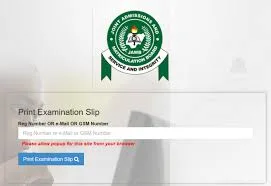
This portal allows candidates to download their slip using their registration number, email address, or phone number.
Step-by-Step Guide to Download JAMB Exam Slip 2026
Follow the steps below to download your UTME exam slip successfully.
Step 1: Visit the JAMB Slip Printing Portal
Open your internet browser and visit the official portal:
https://slipsprinting.jamb.gov.ng
Make sure your internet connection is stable.
Step 2: Enter Your Registration Details
On the portal page, you will see a field requesting your details.
You can enter any of the following:
- JAMB registration number
- email address used during registration
- phone number used during registration
Ensure the details you enter are correct.
Step 3: Click “Print Examination Slip”
After entering your details, click the Print Examination Slip button.
The system will display your exam information.
Step 4: Download Your Exam Slip
Once the slip appears on the screen, download it to your device.
You can save it as a PDF file on your phone or computer.
Step 5: Print the Slip
After downloading the slip, print it.
Candidates are advised to print at least two copies and keep them safe.
Alternative Method to Download and Print JAMB Slip
Candidates who do not have access to internet or a printer can visit a cyber café.
Follow these steps.
- Go to a nearby cyber café
- Provide your JAMB registration number
- The café operator will open the portal
- Your slip will be downloaded and printed
Cyber cafés usually charge ₦200 to ₦1000 depending on the location.
Important Things to Do After Downloading Your JAMB Slip
After downloading and printing your slip, there are important things you should do.
1. Check your exam centre
Look carefully at the CBT centre address shown on your slip.
If possible, visit the centre before the exam day.
2. Confirm your exam date and time
Your slip will clearly show your exam schedule.
Candidates should arrive at least one hour before the exam begins.
3. Keep multiple copies of the slip
Printing more than one copy helps you avoid problems if one copy gets lost.
4. Prepare for the UTME examination
Use the remaining time before the exam to study your subjects and revise important topics.
Common Problems When Downloading JAMB Slip
Some candidates experience difficulties while trying to download their exam slips.
The table below explains common problems and how to solve them.
| Problem | Solution |
|---|---|
| Portal not opening | Wait and try again later |
| Incorrect registration number | Check your details carefully |
| Slip not displaying | Refresh the page or change browser |
| File not downloading | Check internet connection |
If the issue continues, candidates can visit a JAMB CBT centre for assistance.
Frequently Asked Questions
Is downloading JAMB exam slip free?
Yes. Downloading the slip from the JAMB portal is free. Cyber cafés may charge a small service fee for printing.
Can I download my JAMB slip with my phone?
Yes. You can use your smartphone to download the slip. However, you will still need access to a printer to print it.
Can I download my slip more than once?
Yes. Candidates can download and print their slip multiple times before their exam date.
What happens if I lose my exam slip?
You can simply return to the portal and download another copy.
Conclusion
Candidates preparing for the 2026 UTME should begin checking the official portal as from April 9, 2026 to download their examination slip.
Do not wait until the last minute.
Downloading and printing your slip early allows you to confirm your exam centre, know your exam schedule, and prepare properly for the UTME examination.
Always keep your slip safe and arrive at the CBT centre early on the exam day.





Leave a Comment